PMM1106 - Tracker Control unit
Single-axis solar tracker control unit. It follows the sun automatically, and also offers manual, remote, calibration and wind-park modes. It talks Modbus and is set up and monitored with the PMM Tracker Controller software.
Key features
- Automatic sun tracking from the site latitude, longitude, time zone and a real-time clock
- Eight operating modes: manual, auto remote, auto local, alarm, emergency, programming, calibration and parking
- Wind protection settings: a wind speed limit with in and out time-outs for parking the tracker
- Angle limits, park angle, calibration angle and tolerance are all set from the software, to 0.01 degree
- Actual angle reported by the unit angle sensor, shown beside the target angle
- East and west motor relay outputs, with inputs for manual east, manual west, manual/auto switch, limit-switch feedback and loss of power
- Six alarms: general, data validation, communication, actual position, movement and date/time
- Backtracking angle calculation to reduce shading between rows
- Modbus communication over RS485 or through a Modbus TCP gateway
- Remote target angle: send a tracker, a port, a zone or the whole site to a chosen angle
- Clock set from the PC or from network time
- Live monitoring, alarm list with acknowledge, and event logs on the PC
Overview
The PMM1106 is a control unit for single-axis solar trackers. It drives a tracker east and west so that the panels face the sun through the day. In automatic mode it works out the sun position from the date, time and site location, and moves the tracker to the best angle, checking its real position against the target all the time.
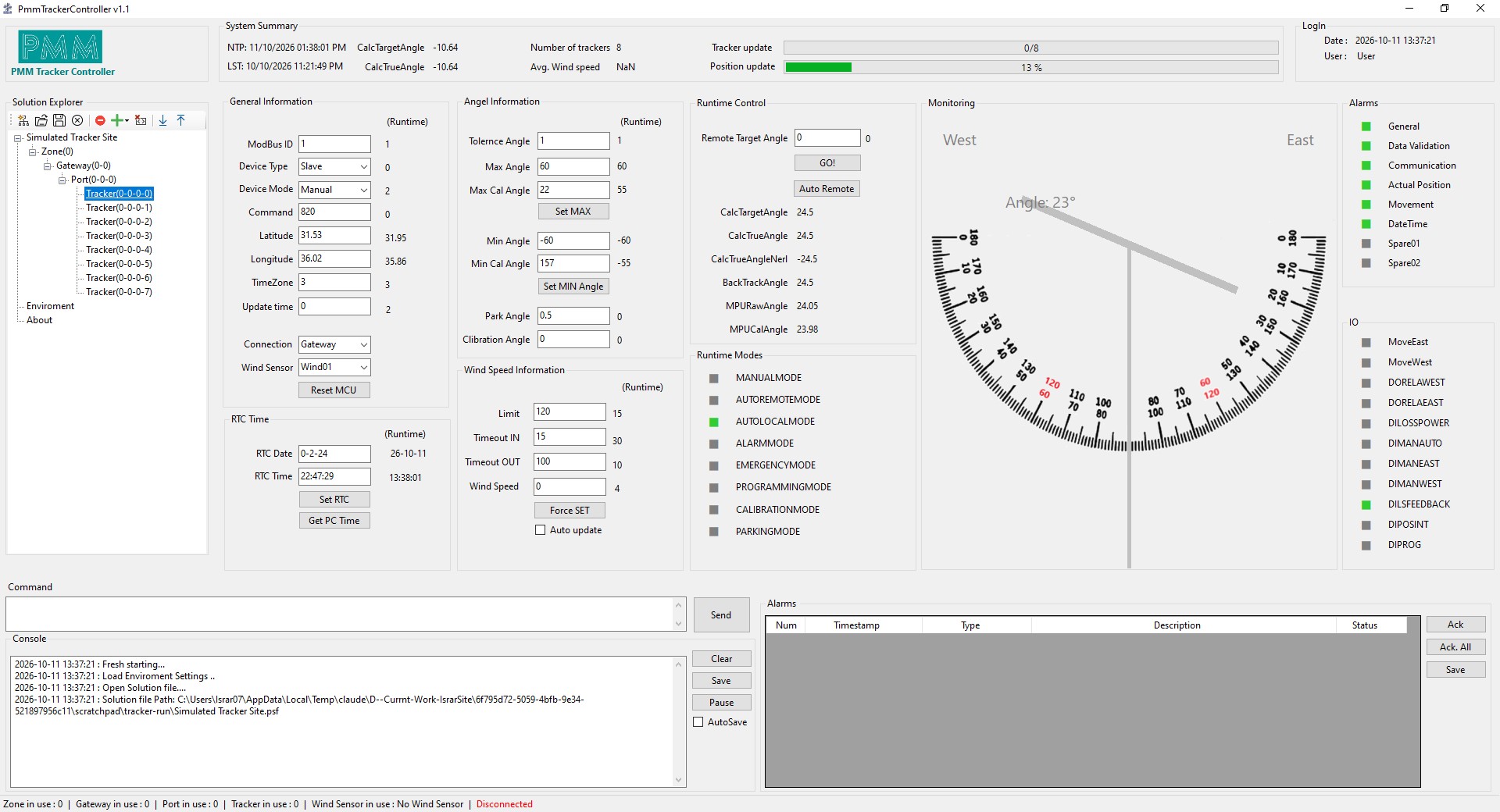
You set up and watch the unit with the PMM Tracker Controller software on a PC. One screen shows the angle gauge, the operating mode, the wind speed, the inputs and outputs, and the alarms. The same software can manage many trackers, grouped by zone, gateway and port.
How it works
The unit keeps its own clock and knows the site position. At each position update (a time you set in minutes) it calculates where the sun is, checks the limits you set, and moves the tracker east or west until the measured angle is within the tolerance of the target. It then stops and waits for the next update.
The software also shows the sun calculation for the site, such as elevation, azimuth, sunrise and sunset, so you can check that the tracker is doing what it should.
Operating modes
- Auto local: the unit follows the sun by itself using its clock and settings.
- Auto remote: a supervisor (the software, a gateway or a SCADA system) sends the target angle.
- Manual: an operator moves the tracker east or west with the manual inputs, or sends a fixed angle.
- Calibration: sets the angle reference so the readings match the real tracker position.
- Parking: moves to the park angle, for example in strong wind.
- Emergency, alarm and programming: shown on the screen so the operator always knows the state of the unit.
Wind protection and alarms
Each tracker has a wind speed limit, a time-in and a time-out, and a park angle, all set from the software. The wind speed itself comes from a wind sensor on the Modbus line, and the current value is shown on the tracker page.
Alarms are shown in red in the software and listed with a time stamp, so you can acknowledge them one by one or all together: general, data validation, communication, actual position, movement and date/time.
PMM Tracker Controller software
- Organises the site as zones, gateways, ports and trackers, in a tree.
- One page per tracker with the angle gauge, runtime modes, inputs and outputs, and alarms.
- Group control: send a target angle or change the mode for a port, a zone or the project.
- Saves the whole project in a file, so a site can be set up once and reused.
- Sign-in for a user and an administrator, with a console log and an option to save events to a file.
The pictures on this page were taken from the software running with simulated trackers.
Connection
The unit speaks Modbus. The software connects to a Modbus TCP gateway over Ethernet, or to the unit directly through a serial port such as USB or RS485. Each tracker has its own Modbus ID, and the software reads and writes the tracker registers every few seconds. Ethernet and serial settings (address, baud rate, parity, time-out, retries) are set from the Environment page.
Specifications
| Tracking | |
|---|---|
| Axis | Single axis, east-west |
| Angle range | Default plus or minus 60 degrees, set from the software |
| Angle resolution | 0.01 degree |
| Position update | Set in minutes |
| Operating modes | 8 (manual, auto remote, auto local, alarm, emergency, programming, calibration, parking) |
| Wind protection | Limit, time-in and time-out set from the software |
| Inputs and outputs | |
| Outputs | East and west motor relays |
| Inputs | Manual east, manual west, manual/auto, limit-switch feedback, position interrupt, programming, loss of power |
| Communication | |
| Protocol | Modbus (RTU over RS485 or serial, or Modbus TCP through a gateway) |
| Data per tracker | 32 input registers and 32 discrete inputs read, 32 registers written |
| Software | |
| PC software | PMM Tracker Controller for Windows |